How I Built This Site
Published: 10/7/2025
When I originally made my first personal website, it was mainly a learning exercise in how to build a full‑stack application. It was a simple SPA with a backend that proxied info from a database. In hindsight, the way I built it was overkill in some areas, while the important parts were an afterthought (as well as not being the best designed). After doing mainly backend work at my job, I thought it would be a good exercise to rebuild the entire thing from scratch as a way to keep my frontend skills sharp. This time, I’m more experienced with different tools and frameworks. With a bit more experience under my belt, I can build this version with what best fits the job, not just what I’m most familiar with.
The Acceptance Criteria
After designing the general look of the site, it was time to choose the tech stack that best suited the project. Going in, I had some general ideas of what the key features should be:
Performance
A key issue with my old site was its slow loading times. Because of its use of a database and unoptimized frontend code, its First Contentful Paint and Largest Contentful Paint were both very slow. This time, I wanted it to load as quickly as possible. Search engine optimization, prefetching data, caching, small bundle sizes—anything to give users a speedy experience. I could achieve this with static site generation + an NGINX server, or by building a server‑side‑rendered (SSR) app with minimal overhead, but a key asterisk was the ability to still have somewhat complex state management. I wanted the ability to use a frontend framework with state management in some areas, but not have to deal with the complexity and overhead of a full‑stack framework like Next.js.
Blog Content
One big change in this redesign is that I wanted the ability to write blog posts. With this being the main dynamic content of the site, I wanted something with a simple way to plug in blog content. I don’t need to make a custom HTML page per article—just pass in some Markdown and it’s done.
Self‑Hosted
The main learning experience from this new site was wanting to learn how to host it myself. I’ve been toying with a home server for some time, so I wanted to see what it would take to host a site on it.
The Tech Stack
Now with the key features in mind:
- Blazing fast speed
- Plug‑and‑play blog content
- Easy to deploy/self‑host
It was time to commit to something. The tools I decided on were: Astro, Svelte, Tailwind, and Cloudflare Tunnels.
Astro
Astro is a content‑driven web framework, with speed, minimal overhead, and content top of mind. Because of Astro’s islands architecture, it allows you to build a website with interactive JavaScript UI components that are hydrated separately from the rest of the page; this means that most of the site will be static HTML, with the interactive components only loading the exact JS they need to run. This lets me have fast loading times for most of the app, but gives me the flexibility to build out more complex components with a frontend framework of my choice. Alongside Astro’s architecture, it supports blogs via content collections, an intuitive way to manage sets of JSON or Markdown that are then passed and rendered on the site. While Astro can run a server by default, you can also compile your site down to a static site (which can easily be hosted on an NGINX server).
Svelte
For those who are unfamiliar, Svelte is a UI framework that compiles to vanilla JS, rather than using a JS runtime like React’s virtual DOM. This means we get high‑performance code with a small bundle size. Additionally, using Astro and Svelte together is a static‑site powerhouse. While React—the most popular frontend framework—comes with a mature community and a ton of great tools, Svelte’s reactivity model with runes, smaller bundle size, and generally faster performance was, to me, worth writing more from scratch. For this project, the robustness of React wasn’t needed, and using something like Next.js would have been overkill. Why use a chainsaw when a knife does the job?
Tailwind
While there isn’t much to note about Tailwind, I want to touch on Tailwind Typography, an official plugin that, when tied with Astro content collections, allows you to easily style Markdown content. Tailwind v4 came out at the beginning of the project, so it was a good time to learn how to leverage some of its new features (and its better performance!).
Cloudflare Tunnels, Docker, and Self Hosted Runners
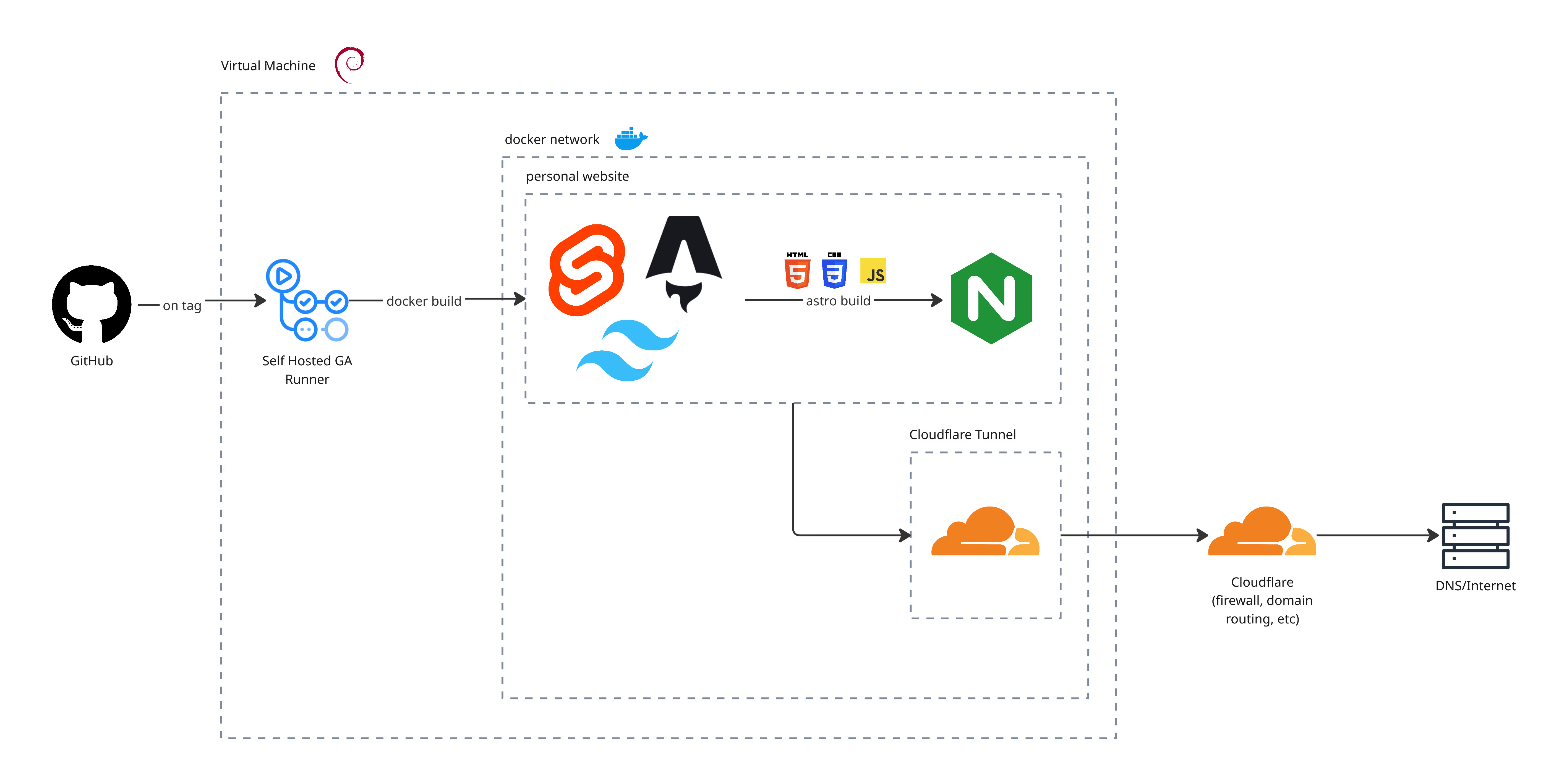
Cloudflare Tunnel is a secure way to expose a service on a private network to the internet. This allows me to securely expose my site on my home server to the internet without opening inbound ports. To keep my attack vector small, I created a VM on the machine and deployed the site and Cloudflare tunnel within it via Docker.
A lightweight cloudflared container maintains an outbound‑only connection to
Cloudflare; requests hit Cloudflare, then traverse the tunnel to the internal
nginx container serving the Astro build. Because we are compiling the site
rather than running on a Node server, the image size is much smaller (and from
my testing, more performant w/nginx).
To tie this all together in a CI/CD pipeline, I created a custom GitHub Actions workflow that builds the site and deploy the container to the server that the action is running on. To get this running on my server, you can actually self-host github actions by creating a Github Actions self-hosted runner.
Results
The rebuild exceeded my expectations. This architectural shift, combined with Svelte’s lightweight runtime and Astro’s aggressive optimization, resulted in a site that’s not only faster but also simpler to maintain. The self-hosting setup with Cloudflare Tunnels proved to be both secure and straightforward. By keeping all connections outbound-only and containerizing everything with Docker, I can update and redeploy with the same simplicity of a cloud-hosted site (if not simpler!).
Metrics
- First Contentful Paint: 2.4s → 1.2s
- Largest Contentful Paint: 6.1s → 1.3s
- Speed Index: 2.3s → 1.2s
- JS bundle: 162.8 KB → 189.3 KB (with much more JS and no offloaded backend!)
- Docker Image Size: 220.14 MB → 80.51 MB
The most valuable lesson wasn’t about any specific technology, but rather about choosing the right tool for the job. My first site was over-engineered in areas that didn’t matter and under-optimized in areas that did. This time around, every technical decision was driven by the actual requirements: speed, content management, and self-hosting. If you’re considering a similar rebuild, my advice is simple: start with your constraints and work backward. Don’t default to what’s popular or what you already know. Sometimes the best solution is the one you haven’t tried yet.